
Search
Twitter
« Expand or Collapse All Grouped Items on SSRS Report | Main | Decision Functions in SSRS »
Saturday
Sep112010

Displaying Fixed Number of Rows per SSRS Report Page

Recently we had a requirement to reduce the height of an SSRS report which was being rendered in SharePoint’s Report Viewer.  When the interactive size property did not have any effect at all, which is still a mystery to me, we decided on a different approach.  The solution we opted to use was to limit the report records displayed to 50 rows per page, which involves using the Ceiling function in SQL Server Reporting Services.

The following discussion presumes that the report has been developed & all that's left is handling the pagination. 

First, add a Row Group which is a Parent of the existing top level group.  In the Group By expression, enter  =CEILING(RowNumber(Nothing)/50) where 50 is the number of records to be displayed per page.  Be sure to leave the group header & footer boxes unchecked.  Since this group’s only purpose will be to force page breaks, we won’t be taking up any real estate on the report.
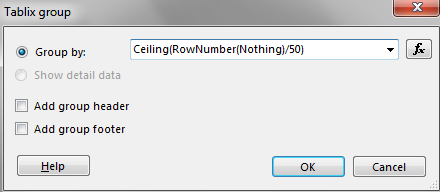
Ceiling function:  Returns the first whole number equal to or higher than its argument.

RowNumber function:  Performs a running count of rows within a specified scope.  The keyword controls the scope of where the counting begins.  By using Nothing, it will utilize the outermost data region (in this example, I only have one tablix data region).  You may also replace the Nothing keyword with the name of a specific data region or group (within quotes).  A discussion of RowNumber can be found here.

Next, right-click the group just created and go to its Group Properties.  Give the group a useful name (because Group1 is certainly not a descriptive name in my humble opinion).  Use whatever makes sense to you or, perhaps more importantly, what would make sense to the next person who is trying to understand the report definition.  I like to use naming conventions to be self-documenting as possible.
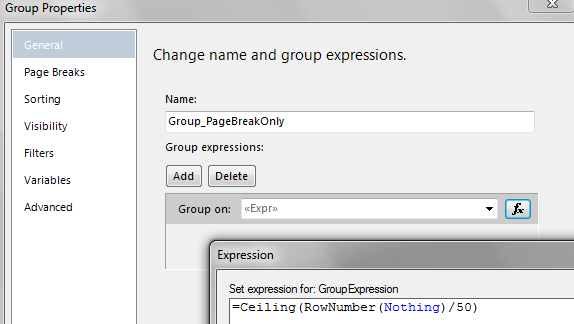
 

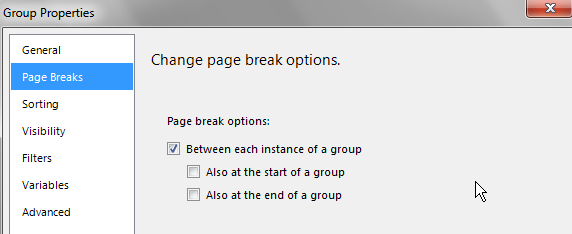
On the Page Breaks section of Group Properties, check “Between each instance of a group.”  Don’t choose to break at the start or end of a group or you could end up with an extra blank page.
Next, go to the Sorting section of Group Properties.  You’ll most likely just want to remove the sorting because it's handled elsewhere.  When you created the group, SSRS automatically created sorting to be the same as your Group By expression.  While this is usually a nice convenience, in this case it’ll cause an error the first time you run the report if you don't remove it.

The Row Groups pane will now look similar to the following:
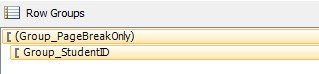
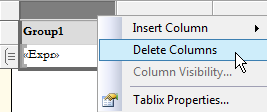
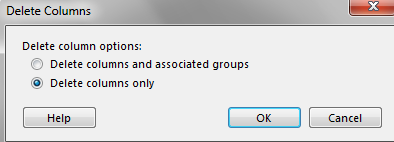
Lastly, delete the first column in the tablix that SSRS created for us automatically when the group was created.  In order to enforce page breaks using this group, we don’t need to actually display anything on the report.  Choose the 2nd radio button to “Delete columns only” which preserves the group itself which contains the Ceiling function.
  

That’s it for handling pagination based on number of records per page.  All that should be left is fine-tuning, such as repeating column headings on each page as discussed in this blog entry.

PrintView Printer Friendly Version

EmailEmail Article to Friend

Reader Comments (15)

That was very useful,

Much thanks

July 12, 2011 | Unregistered CommenterJose Manuel

Hi Mellisa,

Thanks for the post really a nice one . However i have a question how do i achive page breaks at the groups level that is i have an outer most group and right after 3 groups being displayed i want the next 3 to be displayed on another page and so on .. Below is the link about the problem its about the outer most group heading shown at the bottom of the page1 and its data shown on page two . How do i get all of a groups data on the same page ? Thanks for your help in advance.

http://stackoverflow.com/questions/7242112/ssrs-rdlc-report-group-appears-half-on-one-page-and-other-half-on-another

Regards,
Francis P.

September 1, 2011 | Unregistered CommenterFrancis

Hi Francis,

Have you set the "Tablix Member" property called "KeepTogether" for the outer group to be set to True? It's set to False by default.

I talked about the elusive Tablix Member properties a bit here:
Repeating Column Headings and Other Tablix Member Properties

Hope this helps. (By the way, the screen shots of your report look really nice.)
Melissa

September 1, 2011 | Registered CommenterMelissa Coates

Hi Melissa,
I am having a tablix and graph inside a listbox. I tried implementing the above fixed no of rows per page, though I am able to see data in the tablix the graphs are not displaying. Any suggestions regarding the same.

Thanks

January 11, 2012 | Unregistered CommenterDebu

Hi Melissa,

I have specified row page break group to display 15 records per page =CEILING(RowNumber(Nothing)/15). I did the same procedure what you have written, But it displays only one record per page.please advise


Thanks in advance

Lakshmi.v

January 16, 2012 | Unregistered Commenterlakshmi v

i follow your instruction to show fix no of rows but i am getting error called Error A sort expression for the tablix ‘Tablix5’ uses the function RowNumber. RowNumber cannot be used in sort expressions. so tell me what to do to supress this error.

February 10, 2012 | Unregistered CommenterTridip

Tridip,

Your error message mentions a sort expression. So my guess would be that you've got the expression included in the Sort pane when it should only be in the Group pane. You'll likely want to leave the sorting as it was beforehand.

Thanks for reading,
Melissa

February 10, 2012 | Registered CommenterMelissa Coates

how can i use this way in matrix RDLC report

February 20, 2012 | Unregistered Commentersomaya

The steps provided were very simple and to the point.

Thank you so much

May 10, 2012 | Unregistered CommenterRashmi G

god bless you, it is very helpful because the subreports doesn't allow footer

May 16, 2012 | Unregistered Commenterandres

Hi Melissa Coates,

Im using the same above you mentioned , but the problem is after the first time page breaking that is appending at the end of the all pages.
Scenario 1:
Divison A : 10 records
Division B : 9 records
after using Groupby "Division "
setting page size is : 10
the following output I am getting:
First Page : Division A 8 records
Second Page : Division B 8 records
Third Page : Division B 1 record
Division A 2 records.

July 25, 2012 | Unregistered Commentermahesh

Mahesh,

I'd double check the sorting within each group.

Thanks for reading!
Melissa

July 25, 2012 | Registered CommenterMelissa Coates

Hi Melissa,
I have a dataset that returns 100 records which i display in a tablix. After every 10th record, i display a blank line using the Hidden properties of the Static member under the Advanced options (=IIf(RowNumber(Nothing) MOD 10, True, False)). This all works fine but now i have to filter some of these records out of the display which then messes up the display of the blank line. Is there any way in which i can count the records in the tablix instead of the returned dataset so that it does not mess up the display of the blank line after every 10th record?

July 27, 2012 | Unregistered CommenterAnthony

Anthony,

I haven't tried to do exactly what you're describing, but I wonder if you couldn't do something along the lines of:
- Use a RunningValue() function that just counts up a measure of 1 on the rows (using a hidden textbox)
- Use a Previous() function that controls the visibility of the blank line if the RunningValue is 10 (looking at the value of the hidden textbox using ReportItems!TextboxName.Value). I'm thinking I would do this using the row visibility settings.

I can see where having a filter would make what you're doing much trickier. Good luck with it!

Melissa

July 28, 2012 | Registered CommenterMelissa Coates

This is a good solution, but I couldnt use it because of two problems:-

1) When in viewing the report in the browser, it doesnt displays number of pages and a clear link to next pages rather it is in the report header/navigation which might be a bit confusing for the users.

2) in the report sent via subscription email, it only adds line break and headers.

October 17, 2012 | Unregistered CommenterTahir

PostPost a New Comment

Enter your information below to add a new comment.

My response is on my own website »
Author Email (optional):
Author URL (optional):
Post:
 
Some HTML allowed: <a href="" title=""> <abbr title=""> <acronym title=""> <b> <blockquote cite=""> <code> <em> <i> <strike> <strong>