
After utilizing these properties to repeat column headings in SQL Server Reporting Services, I got curious as to what the rest of the properties do. Here’s a brief reference.
The Advanced Tablix Member Properties are located in the Advanced Mode of the Grouping pane (the down arrow turns Advanced on and off).

Types of Tablix Members
|
Type |
Description |
|
Static |
Items which repeat once for the row or column group, such as labels or subtotals. -->Settings to repeat column titles on each page are done with static members. |
|
Dynamic |
Items which repeat within the group, such as the detail rows. |
Tablix Member Properties
|
Property Name |
Default Value |
Description of Use |
|
Commonly used: |
||
|
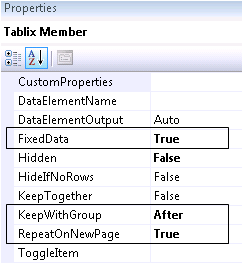
FixedData |
False |
Causes headers to behave like Excel’s “Freeze Panes” functionality when scrolling |
|
Hidden |
False |
Hides the member |
|
HideIfNoRows |
False |
Hides if there are now rows of data (useful to use instead of an iif expression) |
|
KeepTogether |
False |
Keeps the entire tablix on one page if possible (this setting may cause white space before it) |
|
KeepWithGroup |
After |
After keeps the header with the group of data after the header (Before keeps the footer with the group of data before it) |
|
RepeatOnNewPage |
False |
Re-displays the label on every page |
|
ToggleItem |
Blank |
Specifies if this member is hidden or shown based on another textbox – this specifies the other textbox that controls it |
|
Less commonly used: |
||
|
CustomProperties |
Blank |
For use with custom report renderers |
|
DataElementName |
Blank |
For use with XML output: sets the name of the element |
|
DataElementOutput |
Auto |
For use with XML output: controls whether element should be rendered |
Repeating Column Headings
Settings for the first (Static) member in Row Groups to ensure column headings are repeated on each page & columns are frozen when scrolling in a web browser:
Additional documentation can be found at:
MSDN-Controlling Row and Column Headings
MSDN-How to Display Headers and Footers with a Group