
Search
Twitter
Links
« Using Dual Join to Dimension to Retrieve All Historical Fact Table Rows | Main | Displaying Fixed Number of Rows per SSRS Report Page »
Sunday
Sep192010

Expand or Collapse All Grouped Items on SSRS Report

We have a few reports which group the first column of data, then hide the detail rows when the report is initially displayed.  This is a commonly used solution, and a really nice feature to conserve space on the page.  However, by default SQL Server Reporting Services doesn’t provide the end user with a one-click option to “Expand All” or “Collapse All” of the grouped rows. 

As an example, here is a very simple report which would require the end user to click 7 times in order to see the complete list. 
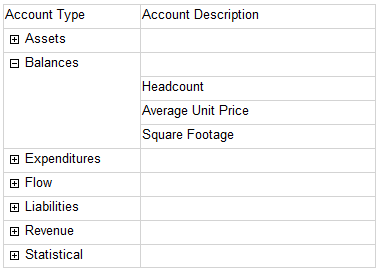
Much more than a couple of clicks can be a little annoying, particularly if the end user is in a hurry.  In my opinion, too many clicks reduces the usability of a report & could prevent the end user from seeing something pertinent.  For those reasons, I wanted to find a way to implement two buttons on the report:  one button to ‘Expand All’ rows and one to ‘Collapse All’ rows.

Note:  for purposes of this example, we are focusing on functionality & overlooking nice report formatting which I would normally do.

1. Create a new report.  I'm calling mine AccountListByType.

2. Create a dataset, using AdventureWorksDW2008.

SELECT  AccountType, AccountDescription

FROM DimAccount

WHERE  AccountType <> ' '

3. Add a table to the body of the report.  Add the AccountDescription field to the Details row.  You may delete the 2nd and 3rd columns.

4. In the Row Groups pane, right-click the Details group and choose to Add Group > Parent Group.  In the 'Group by' choice, select AccountType.  Check the box to ‘Add group header.’   (If 2008 but not R2 yet:  Change the column title to Account Type.)

5. If 2008 but not R2 yet:  In the Row Groups pane, right click Group 1 and choose Group Properties.  Rename it to Group_AccountType (because Group1 is not a very helpful name).  Set the Sorting to be first on Account Type, then on Account Description.

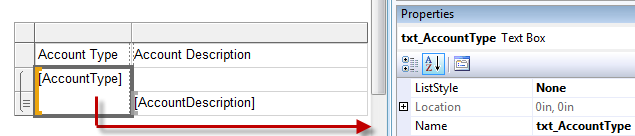
6. If 2008 but not R2 yet:  On the report body, select the textbox with the grouped data.  In the Properties pane, replace the Group1 Name with txt_AccountType.  R2 will already have AccountType as the name - you may prefix it with txt if you'd like - I tend to do that & it's my cue that I've done something else, somewhere in the report with that textbox. 

It's important to ensure the textbox name is descriptive because we are going to be using this textbox in a toggle property, so it’s helpful to use a good name.
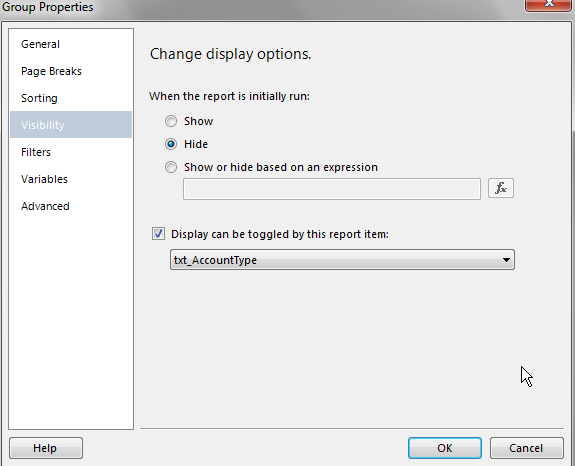
7. In the Row Groups pane, right-click the Details group and choose Group Properties.  On the Visibility settings, choose the radio button to Hide the details.  Check the box so that ‘Display can be toggled by this report item’ and select the txt_AccountType textbox we just renamed in the previous step.
8. Test the report here to ensure it runs properly.  At this point we have the report created that was shown at the very beginning of this blog entry.  Next comes the fun part.

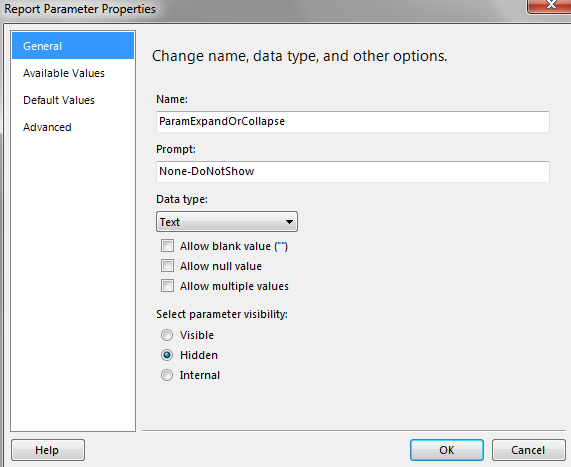
9. Create a parameter called “ParamExpandOrCollapse” (or whatever fits your normal naming convention).

General

Prompt:   None needed, as this will be hidden.

Data type:  text.

Parameter visibility:  hidden.
 

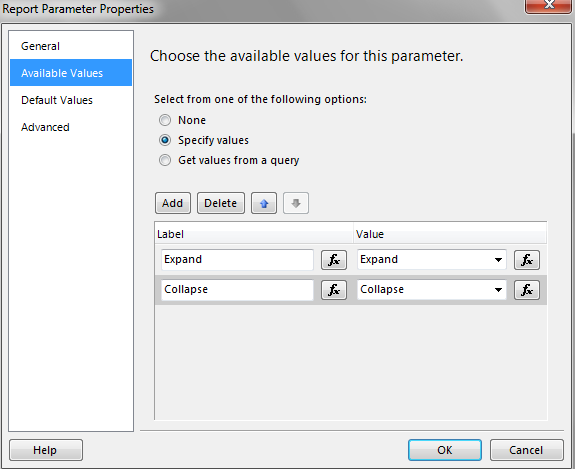
Available Values

Specify values works well for this situation. 

Add two choices:  one to Expand, and one to Collapse.  The Label and Value may be the same.
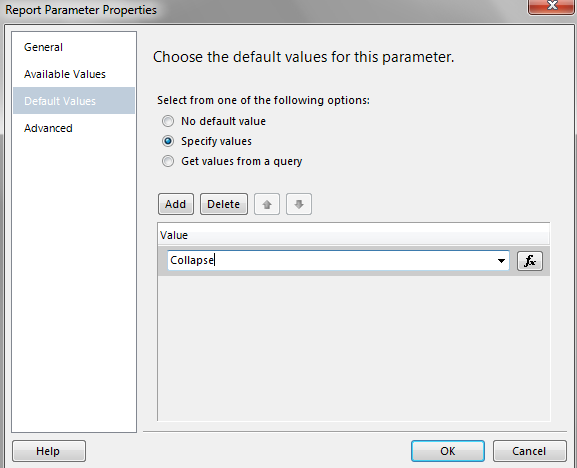
Default Values

Specify values works well for this situation. 

Add the value Collapse as the default.
 

10. In the Row Groups pane, right-click the Details group and go to its Group Properties.  On the Visibility settings, change the radio button from Hide to ‘Show or hide based on an expression.’  Enter the following expression:

=iif(Parameters!ParamExpandOrCollapse.Value = "Collapse", True, False)

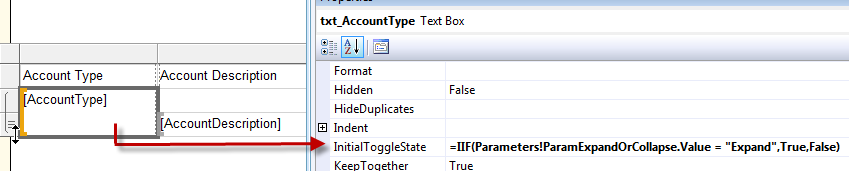
11. On the report, select the txt_AccountType textbox.  In the Properties pane, set the Initial Toggle State property to the following expression.  This will cause the + or – symbol to display correctly based upon the current parameter value.

=IIF(Parameters!ParamExpandOrCollapse.Value = "Expand",True,False)
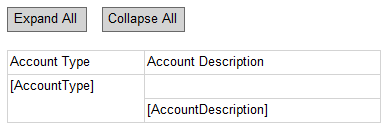
12. On the body, above the table, create two textboxes which will serve as our buttons - the the end user will interact with these buttons.  (These two textboxes don’t really look like buttons so images would work better in a real life situation.)
13. Set properties for both of the buttons.  This is where it all comes together.  When the user clicks a button, a report Action will call the same report (i.e., this report is calling itself, rather than drilling through to another report which would be a more normal use of an Action).  By using a report Action, we are able to set the parameter values. 

Choice 1:  Use a ‘Go to Report’ Action. 

Following are the Action properties for the Expand All textbox, when Go to Report is the Action.

Specify a report:  the same report we are currently working in.

Parameters to run the report:  Name - ParamExpandOrCollapse.  Value – Expand.
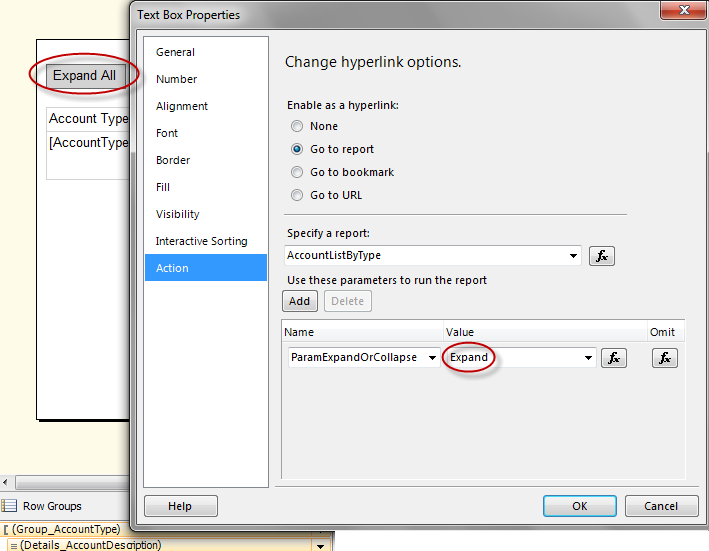
Do the same thing as above for the Collapse All textbox, with the Value being “Collapse” instead.

Choice 2:  Use a ‘Go to URL’ Action. 

Following are the Action properties for the Expand All textbox, when Go to URL is the Action.

="http://Localhost/reportserver?/EducationDWReports/AccountListByType

&rs:Command=Render&rs:Format=HTML4.0&rc:Toolbar=false&ParamExpandOrCollapse=Expand"
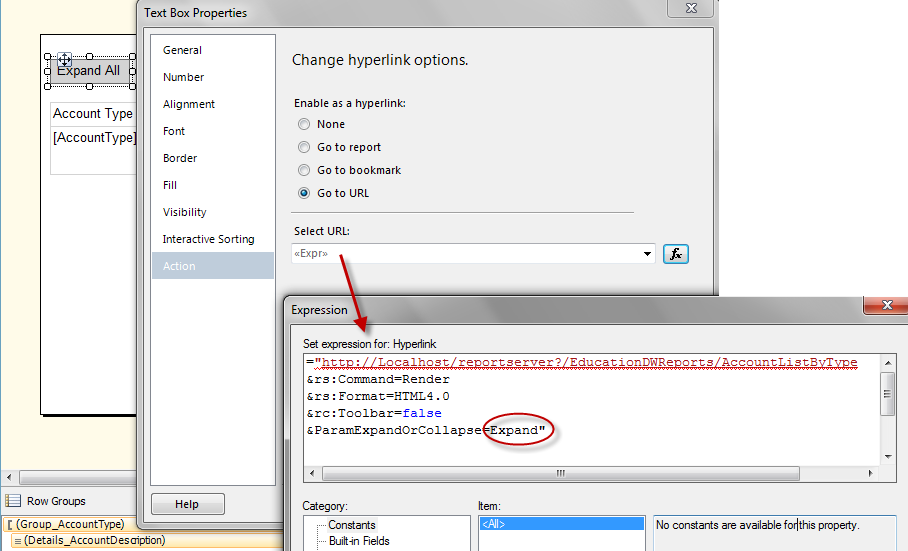
 

Do the same thing as above for the Collapse All textbox, with the parameter passed in the URL being “Collapse” instead.

That’s it.  To my knowledge, we cannot access a property within SSRS to obtain the current toggle state, so we are making use of the parameter state instead.  The key to making it all work is finding a method of setting the parameter without displaying the parameters pane.  The report Action serves that purpose by setting the parameter state when the user clicks one of the buttons.  In the first link below under References, Paul Turley mentions that the query is not re-executed which is good from a performance standpoint.

This idea could be expanded so that if you have several nested groups, where visibility for each is controlled by the above group, you could create different buttons that only expand a group at a time rather than everything on the entire report.

To make the buttons look nicer and perhaps take up less space, you probably should replace the textboxes with images.  The sample Wrox report (see References below) uses an image and labels,  which look really nice.

References:

MSDN Forums (1)

MSDN Forums (2)

Report Sample from Wrox


PrintView Printer Friendly Version

EmailEmail Article to Friend

Reader Comments (40)

Hi, great post. I am trying to implement this on a report. When I initially run the report everything works fine. I'm able to either hit expand all or collapse all only once and then the buttons do not do anything after trying to click them again. The report doesn't recognize them as having actions anymore. Am I missing something? Any help you could give would be greatly appreciated. Thanks!

April 15, 2011 | Unregistered CommenterZach

Hi Zach,

So to make sure I understand - you can click either the Expand or Collapse & the selected item will work...but only once? If you go back & forth between the two it doesn't change the parameter value properly?

Do you experience this in BIDS, in Report Manager, or both?

Are you using the GUI Action for drill down, or URL? Do you experience the same thing with both methods?

Does the page try to refresh when you click the fake button, or does nothing at all happen?

Thanks for reading my blog! Hopefully we can sort this out.

Melissa

April 15, 2011 | Registered CommenterMelissa Coates

Greate Post dude, instead of button we can hve parameter visible and give the good display for that parameter so that on View Report it loads the report the way you want.

excellent work.

June 22, 2011 | Unregistered CommenterShrichandra Yadav

Shrichandra:

Absolutely! In fact, I did that very recently. I named the parameter "Display of Details" and the Available Value Labels the user saw were "All Detail Collapsed" and "All Detail Expanded". In our situation, we still had the default be collapsed. Thanks for reading!

Melissa

P.S. Sorry for the delay in responding. I've been at the beach on vacation.

June 25, 2011 | Registered CommenterMelissa Coates

Hi Melissa, i has follow your post and modify my ssrs2008 report using Report Builder 3.0. But my 'Expand All' and 'Collapse All' buttons didnt work ! everytime i click on the button the report refresh !
which area that i missed ,,pls advice.

Jas

July 12, 2011 | Unregistered Commenterjas

This is not working for me. I am running Visual Studio 2008 Version 3.5 SP1. I have a matrix report with three grouping levels. I might not be adapting your example correctly to a matrix report.

After following your steps the drill down column does not have the +/- box and the "Expand All" and "Collapse All" buttons do not work.

Any suggestions for adapting your example to a matrix report would be appreciated.

Randy

July 12, 2011 | Unregistered CommenterRandy

Please disregard my earlier post. I figured it all out.

July 12, 2011 | Unregistered CommenterRandy

hi Melissa,
i know what is the cause of it but i still cant resolve the issue. My report has 4 groupings and i has follow your post created Expand All & Collapse All function in the report. How do i make the 1-click button expand/collapse all 4 grouping in the report instead of one group ???
Thx

Jas

July 12, 2011 | Unregistered Commenterjas

Jas - Are you pointing each of your 4 groupings to the same parameter value?

Melissa

July 13, 2011 | Registered CommenterMelissa Coates

Do you know if it is possible to make this functionality work after the report has been exported to excel?

July 21, 2011 | Unregistered CommenterDee

Dee - Not that I know of. Definitely sounds like a wish list item.

Thanks for reading!
Melissa

July 21, 2011 | Registered CommenterMelissa Coates

hi Melissa
i has resolved the 'Expand All' and 'Collapse All'. however, when i export the report into XLS format , the data lost in the output file. ( i has posted at http://social.msdn.microsoft.com/Forums/en-US/sqlreportingservices/thread/820bf8c1-3153-4191-8355-533dbe918cc3 ) ,,is it because i has too many sub-groups in my report ?
( i has 5 sub-groups in my report )

TQ
Jas

July 25, 2011 | Unregistered CommenterJas

Jas -

The errors you're getting aren't something I've experienced so I'm sorry I can't offer any new ideas for you. Like Eileen indicated in the forum posting, it could be due to all sorts of things. I wouldn't think it would be because of your 5 subgroups - the newer versions of Excel seem to render very well from what I've seen.

If I were you, I'd try to rebuild the report from the ground up, testing the export each way to see at which point things break. (Definitely doesn't sound like fun!)

Good luck,
Melissa

July 26, 2011 | Registered CommenterMelissa Coates

I have several parameters (start date, end date, company name, user initials, etc.) that must be specified before the report can be viewed (run). When I specify them and then run the report everything works. Then, when I click the Expand or Collapse button, the parameters are blanked out and no report is produced. How do I save the parameter settings when the Expand or Collapse button is clicked so that the report has the correct parameters?

August 25, 2011 | Unregistered CommenterRandy

Randy -

You'll want to pass each of your parameter values in the Action. This technique is a bit of a faker in that it makes the report call itself again - this causes the need to pass the parameters (just like you would if you were doing a more traditional action of drilling from a summary report to a detail report).

Hope it works for ya.
Melissa

August 25, 2011 | Registered CommenterMelissa Coates

I don't quite understand. Lets make it simple. I have parameters StartDate, EndDate, and ParamExpandOrCollapse. In the "Expand All" and "Collapse All" buttons' Text Box Properties there is an Action section. I need to enable "Go to report" and specify the same report. In the "Use these parameters to run report" section is specified ParamExpandOrCollapse with a value of "Expand". So far so good.

I assume, I also specify StartDate and EndDate in the "Use these parameters to run report" section, but what do I specify as their values?

August 26, 2011 | Unregistered CommenterRandy

Randy -

When you pass parameters from one report to another, there's two pieces of info you provide:

(A) Parameter Name (left side). Ideally these should always be the same between reports. Since in this case you are "faking" a drill to the same report, this is no problem.

(B) Parameter Value (right side). You can do it one of two ways: using the Parameters collection, or the Fields collection. Format if data is relational (not a cube source) is:
=Parameters!StartDate.Value (or)
=Fields!StartDate.Value (if the parameterized field is also contained in your query)

Hope that helps.
Melissa

August 26, 2011 | Registered CommenterMelissa Coates

I found that if I specified StartDate on the left (Name column) and on the right (Value) I specified [@StartDate], then it works. I have severl other parameters such as Entity which has a value of [@Entity]. So I am past this problem and back to a new problem with the Expand and Collapse.

My problem now is that when I click on the Expand or Collapse button I get an error in the Reserved.ReportViewerWebControl.axd in the following function:

//NOT INTENDED FOR PUBLIC USE. Call SetDocMapAreaVisibility to set the DocMap Visibility
//This updates the HTML DOM to collapse or show the DocMapArea
//Call this when the visiblity on the DocMap has changed so the sizing can be correctly calculated.
//'hideEverything' == true, causes the entire DocMap UI to be 'display:none' rather than 0px wide.
//This is necessary for resize calculations. IE6 and 7 standards mode need to use 0px wide drawing, so the table cells
//in the same TR are correctly calculated (extra 1px appears on the right-hand-side)

_UpdateDocMapAreaUIVisibility: function(hideEverything)
...
...
...
// Splitter visibility
if (this._docMapSplitter._getCollapsable() || makeVisible)
{
if (docMapCells.splitterDocMapHeadCell)
_$RVCommon.SetElementVisibility(docMapCells.splitterDocMapHeadCell, docMapCells.hasNodes);
_$RVCommon.SetElementVisibility(docMapCells.splitterDocMapCell, docMapCells.hasNodes);
}
...
...
...
The error is "Microsoft JScript runtime errro: 'this._docMapSplitter' is null or not an object". I can continue on past this problem and the expansion or collapsing works correctly. It just stops at this point with this error. I don't know how to tell it programmatically to ignore this error. The code is not available for me to edit.

Any suggestions?

August 26, 2011 | Unregistered CommenterRandy

Randy -

From the error it looks like you have a document map. If you remove the document map, does everything work fine? It may be that this technique just isn't compatible with a document map - but that's a complete guess.

If you find a solution or a workaround, please share. Sorry I can't be of more help on this one -- good luck with it!

Melissa

P.S. The [@StartDate] syntax is shorthand for =Parameters!StartDate.Value, so how you handled that was perfect.

August 27, 2011 | Registered CommenterMelissa Coates

I have been all over my SSRS report and cannot find any usage of Document Map. I went to a website that told me how to locate and remove Document Map references in the code, but I was not able to locate any.

While it may sound like I am using Document Map, I cannot find that I am. What I am doing is a collapse and an expand of the groupings as you described at the beginning of this string of posts. Is it possible your method uses the ._getCollapsable functionality of the _DocMapSplitter?

When I get the error and click on "Continue" the report in ReportViewer reacts as I want it to. What I need is some way to tell the Reserve.ReportViewWebCode.asd, which I do not have access to, to automatically "Continue" processing when it gets this error. Any ideas?

August 30, 2011 | Unregistered CommenterRandy

Additional information: Just a reminder that the expand and collapse work fine when I am in SSRS and I have previewed the report. It is when I use my asp.net ReportViewer object to view the report that the expand and collapse are generating the "Microsoft JScript runtime error: 'this._docMapSplitter' is null or not an object" error.

August 30, 2011 | Unregistered CommenterRandy

Randy -

Wow...now I understand. My only experience with this technique has been within SSRS Report Manager (native mode). Wish I had some ideas for you on the Report Viewer control - so sorry.

This isn't ideal by any means, but you might test this out: Create a 2nd report which is a mirror image of the 1st report, except that all groups are already expanded. I'm wondering if you drill through to a legitmate different report (instead of trying to "trick it" by using the same report) if the Report Viewer will behave more reliably.

Will keep my fingers crossed you find a solution.

Melissa

August 30, 2011 | Registered CommenterMelissa Coates

I solved my problem by doing the following:

1) I removed the Width specification from the ReportViewer object. Below is the code with Width still specified.

<rsweb:ReportViewer ID="MyReportViewer" runat="server" Font-Names="Verdana"
Width="100%" Height="100%"
Font-Size="8pt" InteractiveDeviceInfos="(Collection)" ProcessingMode="Remote"
WaitMessageFont-Names="Verdana" WaitMessageFont-Size="14pt" >
<ServerReport ReportPath="/SSRS_TrSummMatrixReports/"
ReportServerUrl="http://000903rharding:8080/ReportServer_SQLSERVER2008" />
</rsweb:ReportViewer>

2) In my codebehind for the ASPX, I added the following in the Load event:

MyReportViewer.SizeToReportContent = True

The combination of the above two changes appears to fix my problem in IE 8. Further testing is underway.

September 6, 2011 | Unregistered CommenterRandy

Randy -

Awesome! Thanks so much for posting a follow-up.

Melissa

September 8, 2011 | Registered CommenterMelissa Coates

My expand works fine, but when I try to collapse I get the following error message

Reported Exception: Exception of type 'System.Web.HttpUnhandledException' was thrown. <----> Inner Exception: Operation is not valid due to the current state of the object.

=== Message ===
Stack Trace: at System.Web.UI.Page.HandleError(Exception e) at System.Web.UI.Page.ProcessRequestMain(Boolean includeStagesBeforeAsyncPoint, Boolean includeStagesAfterAsyncPoint) at System.Web.UI.Page.ProcessRequest(Boolean includeStagesBeforeAsyncPoint, Boolean includeStagesAfterAsyncPoint) at System.Web.UI.Page.ProcessRequest() at System.Web.UI.Page.ProcessRequest(HttpContext context) at ASP.reports_receiptofunauthorizedpropertyquarterlyreport_aspx.ProcessRequest(HttpContext context) in c:\Windows\Microsoft.NET\Framework64\v2.0.50727\Temporary ASP.NET Files\sitrep\bea6c87a\a3b7d009\App_Web_h4vif6jv.0.cs:line 0 at System.Web.HttpApplication.CallHandlerExecutionStep.System.Web.HttpApplication.IExecutionStep.Execute() at System.Web.HttpApplication.ExecuteStep(IExecutionStep step, Boolean& completedSynchronously)

Any ideas on how to fix this issue?

September 13, 2011 | Unregistered CommenterBeth

There is nothing in your error message that rings a bell with me. I wish I could be of more help.

September 13, 2011 | Unregistered CommenterRandy

Thank you! Your guide was very well written and comprehensive. I am using the Client-side report technology RDLC for reports embedded in a .NET application, so here's another piece of information for people in my position: I could not get it to work using the Go to Report action: it gave me the "Data source not set" error, which was understandable since I use an object data source and I feed it to the report in the code-behind of the page containing the report.
The solution for me was to pass the url of the current page as another parameter to the report, and use the Go to URL action, passing it the url parameter I gave him plus another variable in the querystring, which in return I use in the page load event code to set the "ParamExpandOrCollapse" parameter.

October 27, 2011 | Unregistered CommenterPietro

Hi Melissa,
your article is great and I found it very helpful. I tried it out but whenever I click the Expand All/Collapse All buttons, I get the following error:
"a data source instance has not been supplied for the data source 'DataSet1'."

This implies that during the report refresh, the reportviewer cannot rebind itslef to the dataset source. Of course it runs OK whenever I do not click on the buttons.

Do you have any insight on this? I am running a Windows application by the way, VS 2010.

Thank you.

November 2, 2011 | Unregistered CommenterGeorge

I use a relational data source and no matter what I do the Begtin and End Date do not work even when I use =Fields! ..... it keeps reverting back to first date ini the dataset. but the other parameters work when I do Fields!... just fine except the date parameters. Any advice?

November 10, 2011 | Unregistered Commentergogosox2

Gogosox2 -

Sounds like you may want to double check the query is constraining on the parameters correctly from a syntax perspective.

Melissa

November 11, 2011 | Registered CommenterMelissa Coates

PostPost a New Comment

Enter your information below to add a new comment.

My response is on my own website »
Author Email (optional):
Author URL (optional):
Post:
 
Some HTML allowed: <a href="" title=""> <abbr title=""> <acronym title=""> <b> <blockquote cite=""> <code> <em> <i> <strike> <strong>